
Fraud patterns vary by market, and every operator faces its own traffic filtering requirements and unique scenarios. An effective SMS firewall must therefore give operators the flexibility to block any message on their own, without vendor involvement.
Earlier versions of EW SMS Firewall did not always offer that level of control, and some changes still required our support. The new release changes that. With a redesigned interface and reworked core logic, operators can now configure filters through a clear, intuitive, and fully self-service process.
Interface: A New Design and a More Intuitive User Journey
The interface has undergone the biggest transformation. Every element now follows a consistent design system based on Eastwind’s brand identity, while the overall structure has been reorganized around the way specialists actually work with the product.
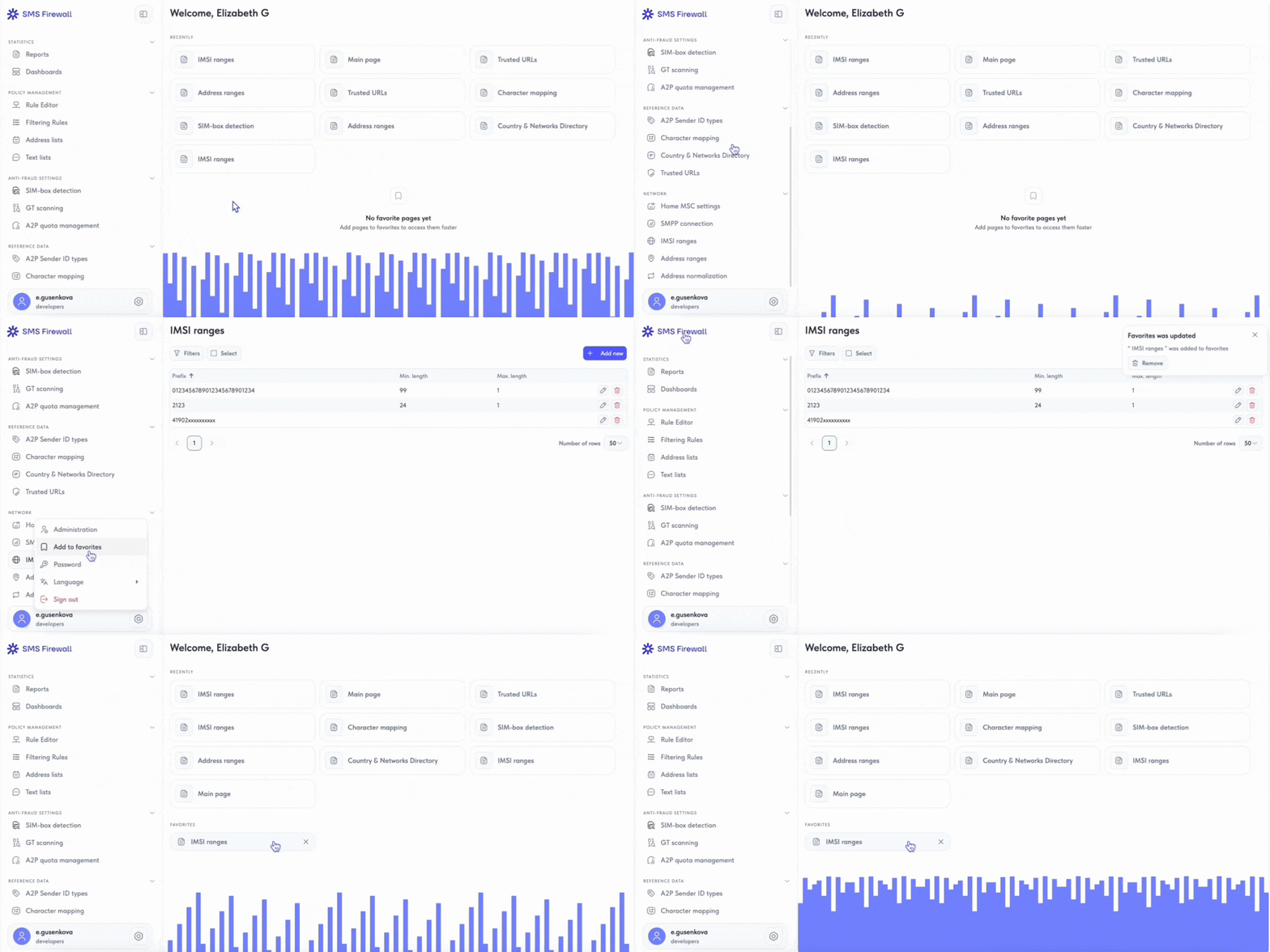
Navigation. Instead of grouping sections by feature type, the new sidebar organizes them around key tasks: statistics and dashboards, rule management, anti-fraud, reference data, and network settings. This brings related workflows together in one place. For example, Anti-Fraud Settings now includes quota management alongside SIM box and GT scanning reports.
Home screen. Favorites and recently opened sections are now available directly on the home screen, so specialists can quickly resume unfinished work or access the tools they use most often. This is especially valuable in a feature-rich interface where some pages sit several levels deep and cannot all fit in the sidebar. Frequently used sections can simply be added to favorites and opened from the home screen with a single click.
A quick checklist for assessing your traffic filtering performance
Get the checklistFlexible Rule Builder
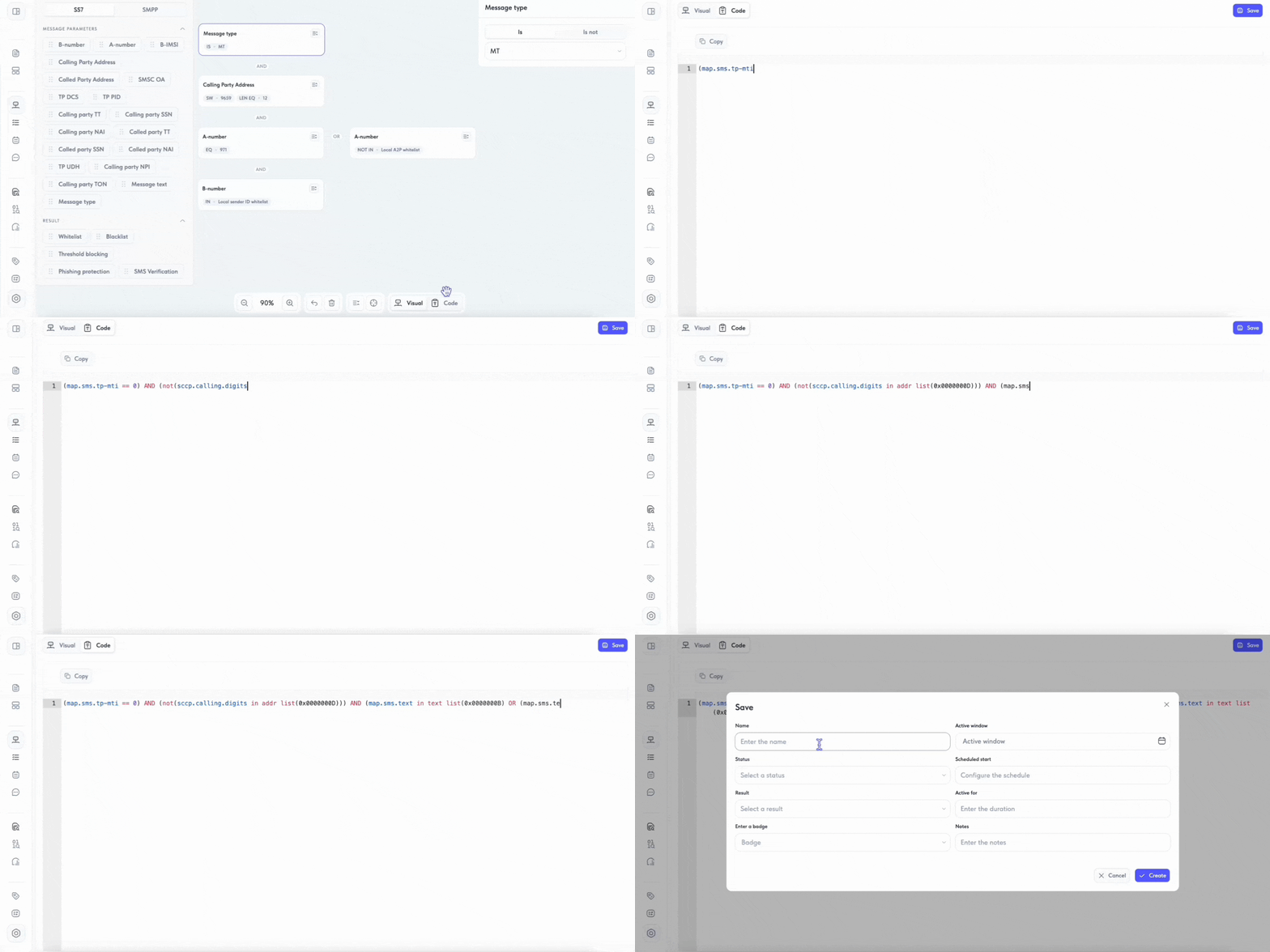
Filtering rules can now be created and edited directly in code. To support this, the system introduces its own Lua like rule language that works with message parameters.
The editor includes syntax highlighting and contextual suggestions. For example, when searching for an address list, the system automatically suggests existing lists, eliminating the need to remember their identifiers.
The language supports AND, OR, and NOT operators along with nested logic. A single expression can combine message type, sender address, routing attributes, sender verification, content patterns, and references to lookup lists. Once created, an expression can be shared with a colleague for review or reused as a starting point for a similar rule.
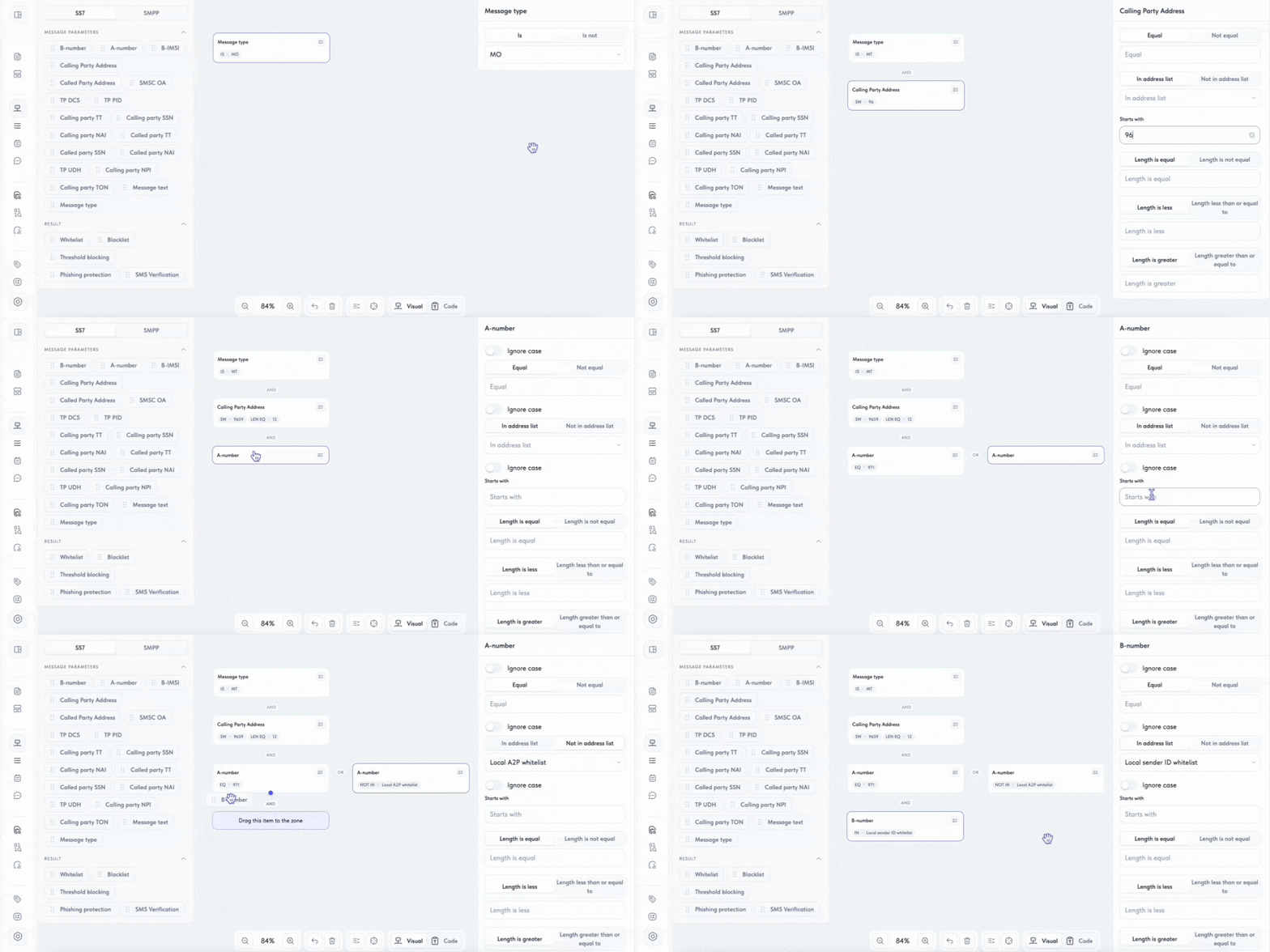
Rules do not need to be defined in code. They can also be built visually from ready made blocks. A specialist drags message parameter blocks from the panel into the workspace and connects them using logical operators.
The available rule parameters are based on the SS7 and SMPP protocols themselves: A number, B number, Calling Party Address, Called Party Address, TP DCS, TP PID, TON, NPI, message type, and message text. Each parameter can be configured in the attributes panel with conditions such as matching or exclusion, membership in an address list, length comparison, and other checks.
The builder supports several action types: allow by whitelist, block by blacklist, block based on thresholds, send to a URL scanner for verification, or forward to external systems for additional checks.
Threshold based blocking works differently from blacklist matching. Instead of evaluating whether message parameters match specified values, it bases the decision on traffic volume or message rate. Three options are available:
- flooding block: triggers when the number of messages from a specified source reaches the configured threshold;
- trigger based block: allows a defined number of messages, then blocks all subsequent messages;
- random block: blocks only a specified percentage of messages that meet the rule conditions.
This mechanism helps stop attacks where neither the sender nor the message pattern looks suspicious in isolation, but the traffic becomes malicious because of its volume.
Filtering rules can also include URL scanning to protect against phishing. The check is configured as an action in the rule builder: the specialist specifies which SMS messages should be sent for inspection, the scanner detects links in the message text, checks them against its databases, and returns a result that determines whether the message is blocked or allowed through to the recipient.
The practical benefit of the update is greater speed and flexibility. Previously, responding to a new fraud scheme required vendor involvement. Now, the operator’s own specialist can quickly build the necessary rule. They only need to understand the relevant traffic parameters, not the internal structure of configuration files, which makes the system easier to work with.
Advanced Filtering Rule Management
New metadata fields make large rule sets much easier to manage. Each rule can now include a name, grouping label, status, and note. The name, for example, can identify the policy purpose, traffic type, and responsible team, making it immediately clear what the rule does and who owns it.
The new “Inactive” status also gives operators more control over the rule lifecycle. An inactive rule stays in the database and remains visible in the interface, but it is not loaded into the core and does not affect traffic. This enables two practical workflows:
- A specialist prepares a rule, the policy owner reviews it, and activates it only after validation.
- If a rule behaves incorrectly, it can be switched off instantly without being deleted. The configuration remains in the system, so there is no need to rebuild the rule later.
Rules can also be activated on a schedule and given an expiration date, making delayed launches and time limited testing straightforward. Restrictions can even be tied to specific times of day. For example, promotional messages can be blocked at night to meet an operator’s contact policies or regulatory requirements.
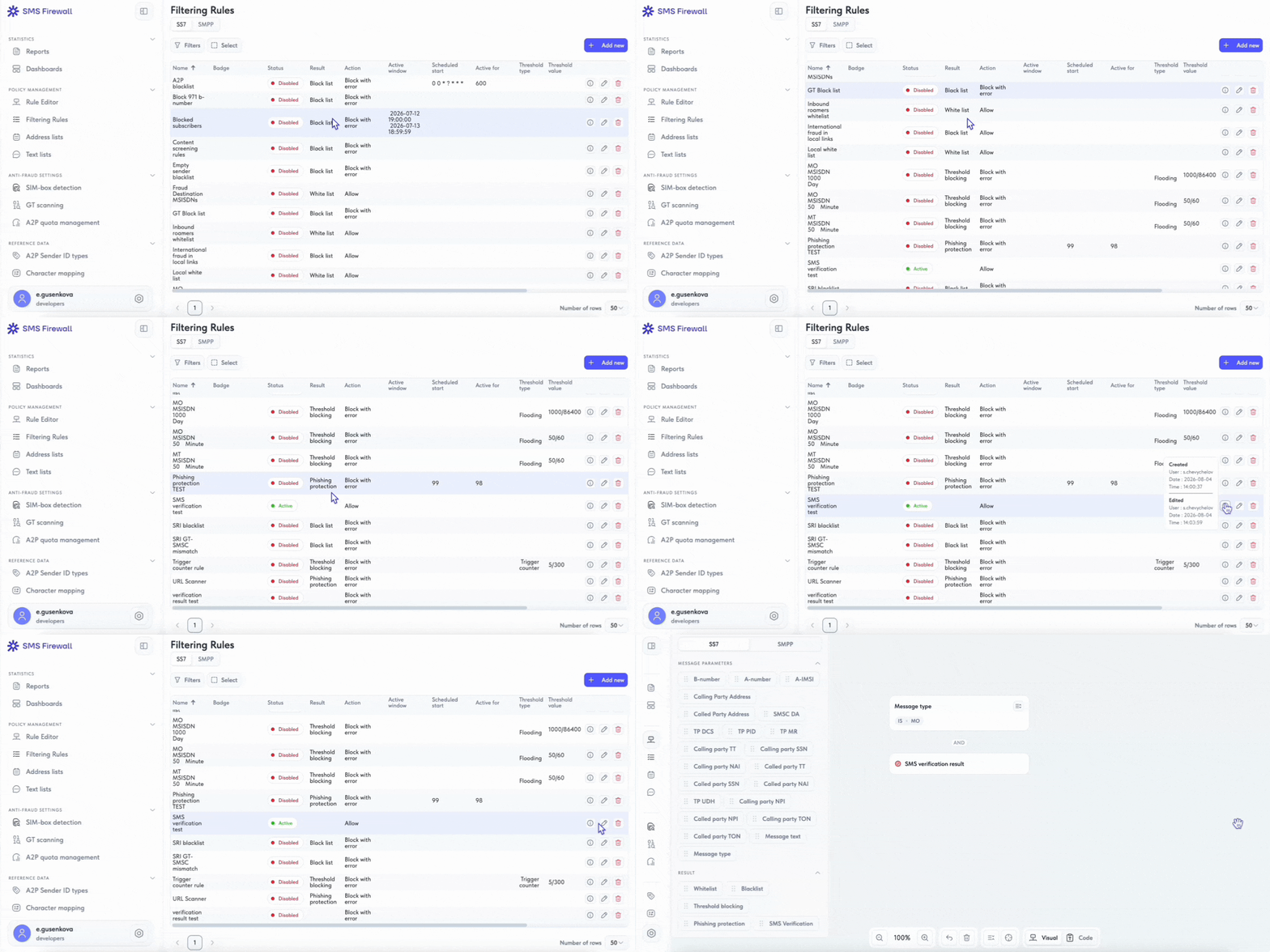
The result is tighter control with less operational risk. New policies can be prepared and validated before they ever touch live traffic, while problematic rules can be stopped immediately without deleting them or losing their configuration history. Even across hundreds of rules, specialists can instantly see what is active, what is disabled, and what is still waiting for review.
Unified Address and Message Text Lists
SS7 and SMPP rules no longer require separate reference lists. Previously, the same A2P sender data often had to be duplicated and maintained in two places, creating the risk that one copy would fall out of date. The new release replaces this with shared address and message text lists that can be referenced by any rule.
Text lists centralize content based filtering. They store regular expressions for fraud campaign templates, legitimate A2P traffic patterns, and other message content criteria. In the new core, all text checks are handled through these lists, creating a single source of truth for accumulated content expertise.
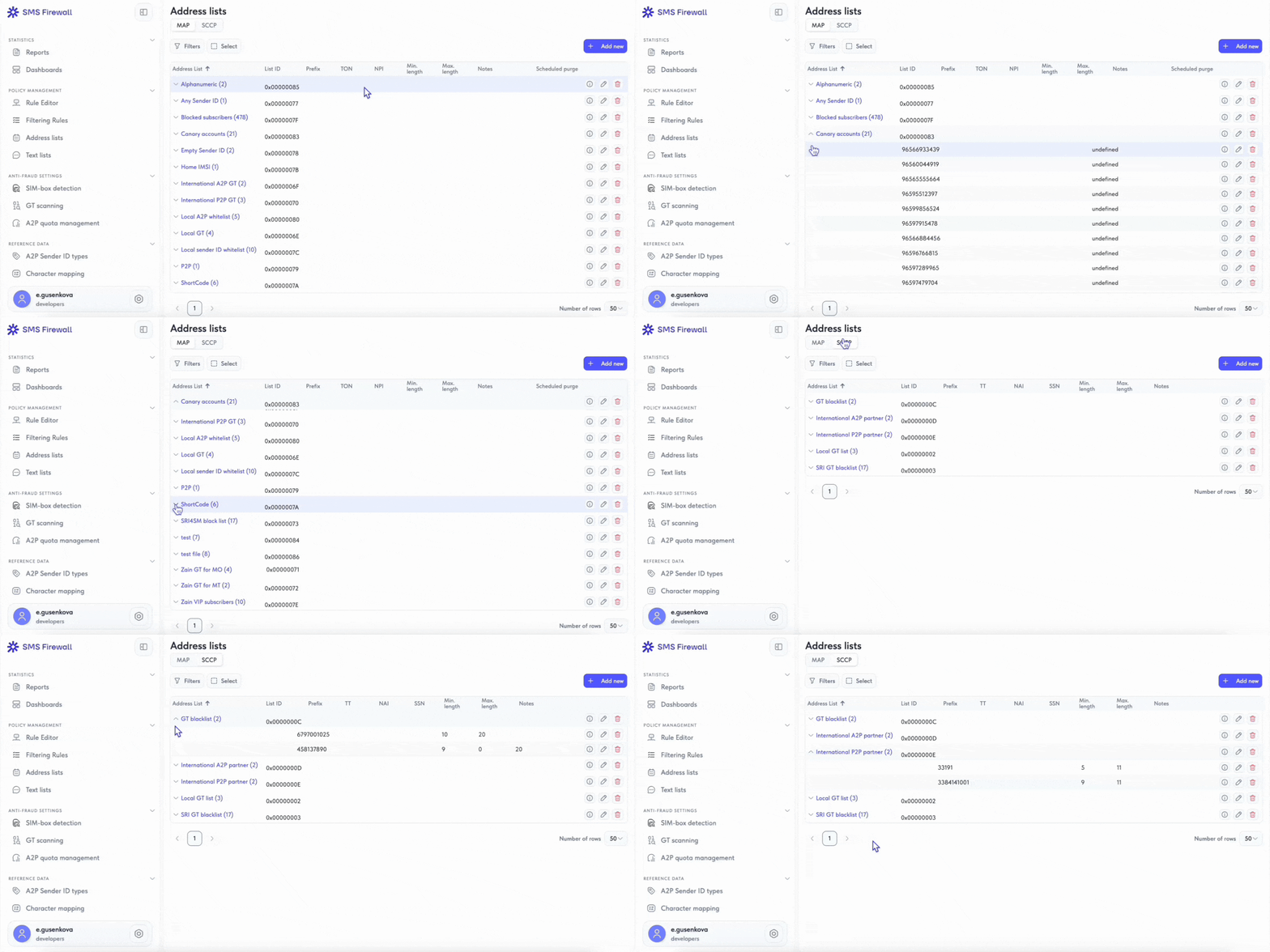
The result is leaner rule logic and centralized updates. The fraud team adds a new address or content pattern once, and the change is immediately reflected across every rule that references the list. This reduces errors, prevents inconsistencies, and shortens the time needed to update filtering policies.
AI Module and URL Scanner in the New Interface
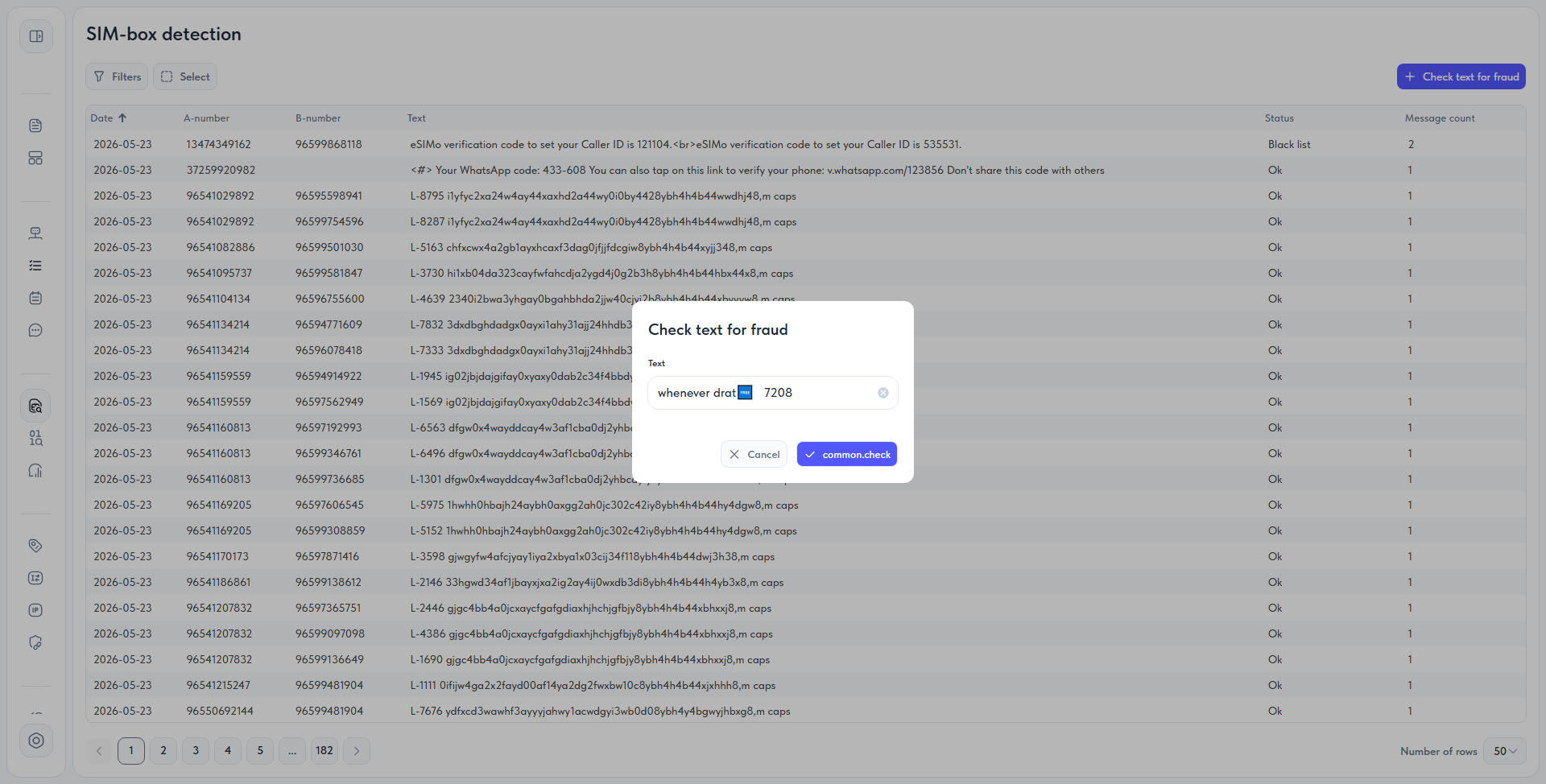
The AI powered anti-fraud module analyzes message content for patterns commonly associated with OTP delivery through SIM boxes. It can identify messages that do not match official templates and instead combine arbitrary text with numeric codes, including numbers obscured through different encodings.
The interface presents the results as a message list with a fraud probability score for each item. The module does not block traffic automatically. Instead, it highlights suspicious messages for human review because some patterns closely resemble legitimate A2P traffic, making false positives particularly costly.
Other Changes
The updates above are the most significant, but they are only part of what has changed. Reporting and access control, for example, were already available in EW SMS Firewall, but this release improves their visual presentation and adds several new capabilities:
- Dashboards are now built directly into the interface. Traffic and A2P monetization analytics are available separately from platform health monitoring, with no need to switch between systems.
- Access control is now more granular. For example, administrators can grant a specific role separate permission to view message text.
Future Plans
Several capabilities in this release were designed as a foundation for future development. One of the key areas is the rule description language, which is now formalized and documented. This makes it possible to connect it to an AI assistant: a specialist could describe a task in natural language and receive a ready to use rule or have the system check policies for conflicts.
From there, the next stage could be an AI agent capable of analyzing traffic, creating filtering rules, and applying them independently.
This release marks a major step in the evolution of EW SMS Firewall. We will continue developing the product to make the user experience more intuitive and traffic filtering more efficient.
See how our solution can help protect your network


